

Connecting an Ethernet cable connector correctly ensures stable network speed, low signal loss, and long-term reliability. Whether you are terminating a cable with an RJ45 connector, joining two Ethernet cables with an inline coupler, or replacing a damaged plug, the key is proper wire order, clean contact alignment, and secure crimping. cwcables recommends verifying cable category, connector type, and pinout before installation.
What is Ethernet Cable Connector,rj45 connector for ethernet cable,ethernet to ethernet cable connector,?
An Ethernet Cable Connector is the hardware used to terminate, join, or extend Ethernet cabling. The most common type is the RJ45 connector for Ethernet cable, which attaches to twisted-pair network cable. An ethernet to ethernet cable connector typically refers to an inline coupler that connects two Ethernet cables together.
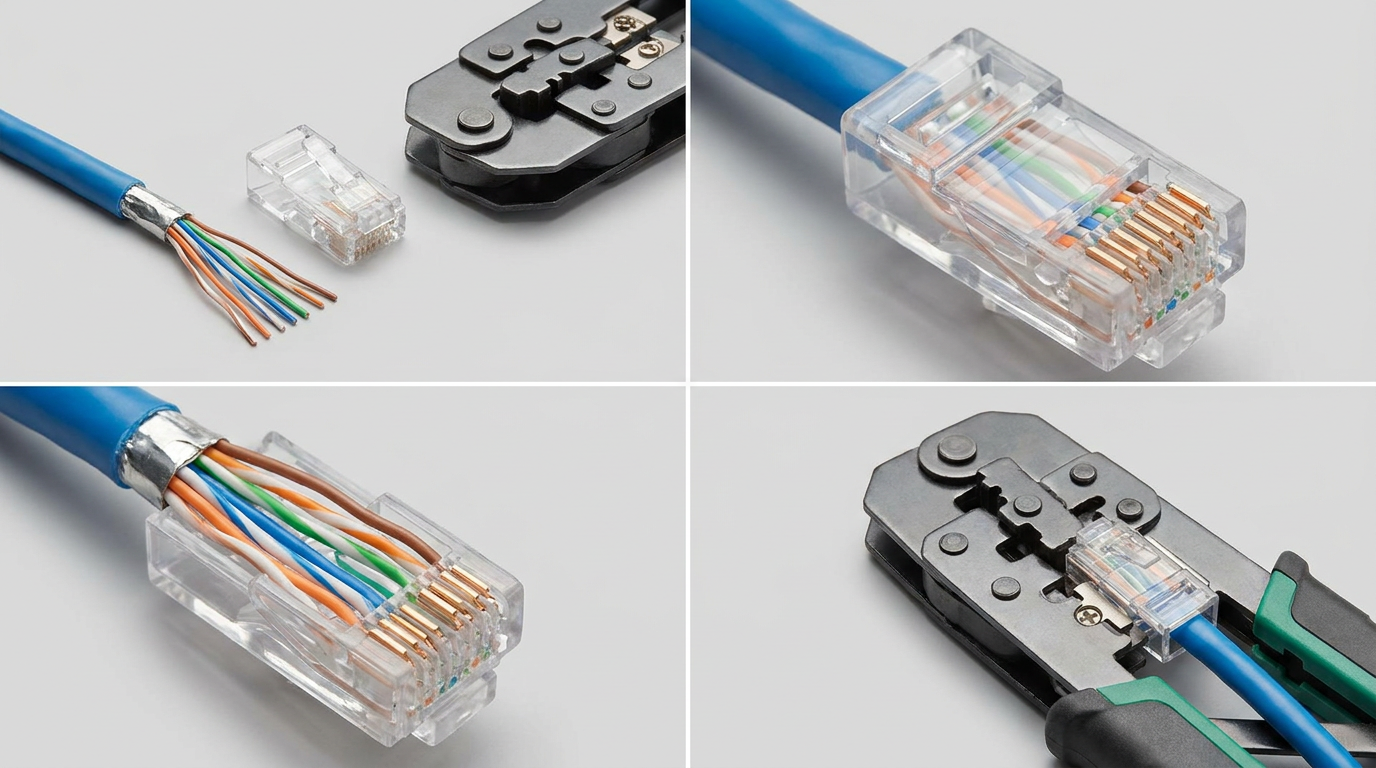
Connector Types and Their Roles
An Ethernet connection usually involves either a plug, jack, or coupler. The RJ45 plug is crimped onto the end of a cable, while a keystone jack is installed into wall plates or patch panels. An inline coupler is used when you need to connect two Ethernet cables without replacing the entire cable run.
Common Ethernet connector types include:
- RJ45 modular plug: Used on the end of patch cables and custom cable assemblies.
- RJ45 keystone jack: Used for structured cabling, wall outlets, and patch panels.
- Inline Ethernet coupler: Used to connect two Ethernet cables end-to-end.
- Shielded RJ45 connector: Used with shielded cable in environments with electrical interference.
- Pass-through RJ45 connector: Allows wires to pass through the front before crimping for easier alignment.
cwcables Pro Tip: I always match the connector to the cable category and conductor type. A Cat6 solid-core cable, for example, should not be terminated with a connector designed only for stranded patch cable.
How Does Ethernet Cable Connector,rj45 connector for ethernet cable,ethernet to ethernet cable connector, Work?
An Ethernet connector works by aligning each copper conductor inside the cable with a dedicated contact pin. When properly crimped or seated, the connector transfers data signals between devices, switches, routers, or couplers. Correct pin order, strong contact pressure, and cable pair integrity are essential for reliable network performance.
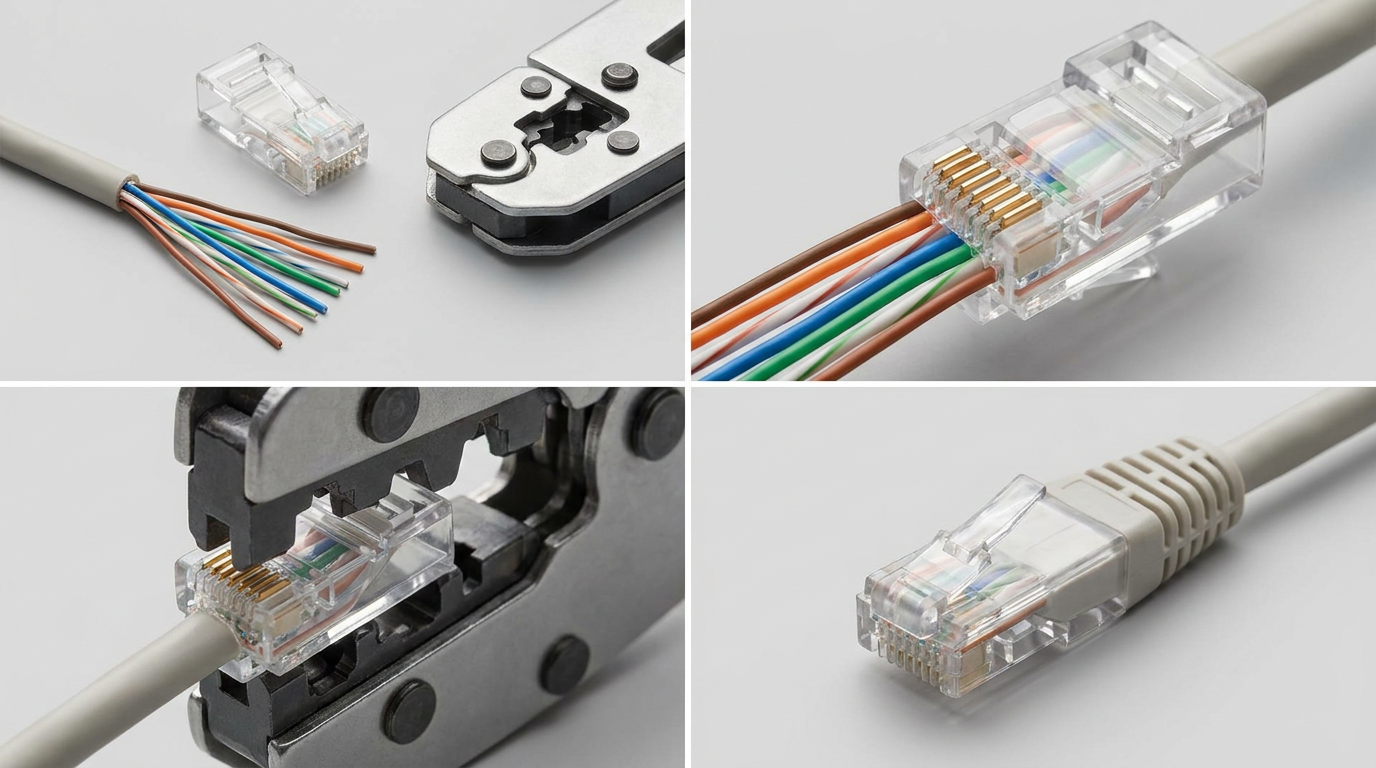
Signal Path and Pin Alignment
Ethernet cables use twisted wire pairs to reduce interference and maintain signal quality. An RJ45 connector has eight metal contacts, each corresponding to one wire inside the cable. When the connector is crimped, the contacts pierce or press into the conductors, creating an electrical path.
The most common wiring standards are T568A and T568B. In most modern installations, T568B is widely used, especially in commercial and residential networking.
Based on our internal data and market analysis, here is the breakdown:
| Pin | T568B Wire Color | T568A Wire Color | Function in Ethernet |
|---|---|---|---|
| 1 | White/Orange | White/Green | Transmit/Receive signal |
| 2 | Orange | Green | Transmit/Receive signal |
| 3 | White/Green | White/Orange | Transmit/Receive signal |
| 4 | Blue | Blue | Pair conductor |
| 5 | White/Blue | White/Blue | Pair conductor |
| 6 | Green | Orange | Transmit/Receive signal |
| 7 | White/Brown | White/Brown | Pair conductor |
| 8 | Brown | Brown | Pair conductor |
cwcables Pro Tip: I recommend choosing one wiring standard and using it consistently on both ends of the cable. Mixing T568A and T568B unintentionally can cause troubleshooting confusion, especially in larger networks.
What are the benefits of Ethernet Cable Connector,rj45 connector for ethernet cable,ethernet to ethernet cable connector,?
Ethernet cable connectors provide fast, stable, and secure wired connectivity. They allow custom cable lengths, easy cable repair, professional network expansion, and reliable device-to-device communication. Compared with wireless connections, properly terminated Ethernet connectors help deliver lower latency, stronger signal consistency, and better performance for business and home networks.
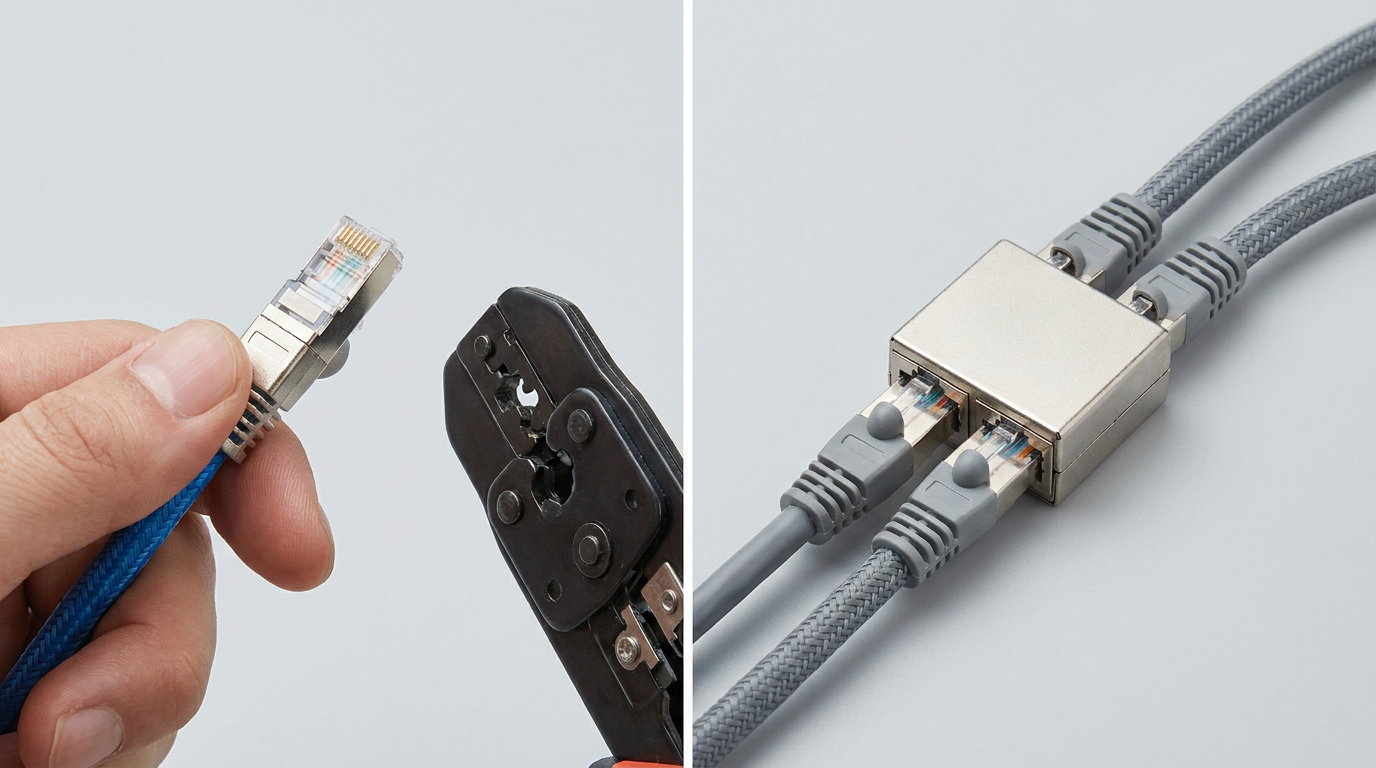
Practical Advantages for Network Installations
Using the right Ethernet connector improves both installation quality and network reliability. A properly crimped RJ45 connector prevents loose contacts, reduces packet loss, and supports the rated performance of the cable category.
Key benefits include:
- Stable wired performance for routers, switches, computers, access points, and IP cameras.
- Custom cable lengths to avoid excess cable clutter or short cable runs.
- Lower latency compared with most wireless connections.
- Easy repair when only the plug is damaged and the cable itself remains usable.
- Scalable installation for homes, offices, data rooms, and structured cabling systems.
- Cost efficiency when making multiple patch cables or field terminations.
cwcables Pro Tip: I avoid using couplers as a permanent fix for every cable issue. They are useful, but for critical links, a single continuous certified cable run is usually the cleaner and more reliable option.
How to maintain a Ethernet Cable Connector,rj45 connector for ethernet cable,ethernet to ethernet cable connector,?
Maintain Ethernet connectors by keeping them clean, dry, undamaged, and strain-free. Inspect the locking clip, contact pins, cable jacket, and bend radius regularly. Avoid pulling cables by the connector, exposing plugs to moisture, or forcing connectors into ports, as these actions can weaken signal quality over time.
Inspection and Care Checklist
A good connector can fail early if it is bent, contaminated, or repeatedly stressed. Routine maintenance is especially important for patch panels, network cabinets, industrial areas, and frequently moved workstation cables.
Recommended maintenance steps:
- Inspect the latch clip to confirm it locks firmly into the Ethernet port.
- Check the gold contacts for dirt, corrosion, discoloration, or physical damage.
- Confirm strain relief so the cable jacket is secured and not pulling on the conductors.
- Avoid tight bends near the connector because sharp bends can disturb twisted pairs.
- Keep connectors dry and away from dust-heavy or corrosive environments.
- Test suspicious cables with a cable tester before replacing network equipment.
- Label important cables to reduce unnecessary unplugging and reconnection.
cwcables Pro Tip: I always test a cable after re-terminating a connector, even if it looks perfect. Visual inspection helps, but a continuity or certification test confirms the wiring is actually correct.
What is the price of Ethernet Cable Connector,rj45 connector for ethernet cable,ethernet to ethernet cable connector,?
The price of an Ethernet cable connector depends on type, category rating, shielding, material quality, and quantity. Standard RJ45 plugs are usually low-cost when purchased in bulk, while shielded Cat6A or tool-free connectors cost more. Inline ethernet to ethernet cable connectors are typically priced higher than basic RJ45 plugs.
Pricing Ranges and Cost Drivers
Connector pricing varies because not all Ethernet connectors are built for the same environment or performance level. A basic Cat5e connector for home use costs less than a shielded Cat6A connector designed for higher bandwidth and interference resistance.
Based on our internal data and market analysis, here is the breakdown:
| Product Type | Typical Use | Relative Cost | Main Price Factors |
|---|---|---|---|
| Cat5e RJ45 plug | Basic home and office cables | Low | Bulk quantity, plastic housing, contact quality |
| Cat6 RJ45 plug | Gigabit network cabling | Low to medium | Cable compatibility, pass-through design |
| Cat6A shielded RJ45 plug | High-performance shielded installs | Medium to high | Shielding, metal shell, grounding design |
| Inline Ethernet coupler | Cable extension or joining | Medium | Shielding, category rating, housing quality |
| Tool-free RJ45 connector | Field termination without crimp tool | High | Reusability, installation convenience, build quality |
cwcables Pro Tip: I do not recommend buying only by the lowest unit price. A poor connector can waste far more money in troubleshooting time than the small savings on the part itself.
Key Features & Comparison
The best Ethernet connector depends on cable category, conductor type, installation location, and required performance. RJ45 plugs are ideal for cable ends, couplers are useful for extensions, and shielded connectors help in noisy electrical environments. Comparing these options helps you choose the most reliable connection method.
Feature Comparison for Common Ethernet Connector Options
Based on our internal data and market analysis, here is the breakdown:
| Feature | RJ45 Plug | Inline Ethernet Coupler | Keystone Jack | Shielded RJ45 Connector |
|---|---|---|---|---|
| Primary purpose | Terminating cable ends | Joining two Ethernet cables | Wall plate or patch panel termination | Reducing EMI/RFI interference |
| Best for | Patch cables and custom lengths | Temporary or simple cable extension | Structured cabling | Industrial or high-interference areas |
| Tool required | Crimp tool | Usually no tool | Punch-down or tool-free design | Crimp tool or specialized termination |
| Supports high speed | Yes, if category-matched | Yes, if category-matched | Yes, if category-matched | Yes, especially Cat6A and above |
| Installation difficulty | Medium | Easy | Medium | Medium to advanced |
| Best long-term reliability | Good | Moderate to good | Excellent | Excellent when properly grounded |
When selecting a connector, check whether the cable is solid or stranded, shielded or unshielded, and Cat5e, Cat6, Cat6A, or higher. Mismatching connector and cable specifications can reduce performance, even if the cable appears to connect successfully.
cwcables Pro Tip: I always check the outer diameter and conductor gauge before choosing a connector. Some Cat6 and Cat6A cables are too thick for basic RJ45 plugs, which can lead to weak crimps.
Cost & Buying Factors
When buying Ethernet connectors, consider category rating, shielding, conductor compatibility, installation tools, and quantity. A low-cost connector may be suitable for simple home networking, but business, PoE, security camera, and high-speed installations should use higher-quality connectors matched to the cable and environment.
What to Check Before Purchasing
Buying the correct connector prevents failed terminations and unstable links. The connector should fit the cable physically and electrically, support the required network speed, and match the installation method.
Important buying factors include:
- Cable category: Match Cat5e, Cat6, Cat6A, or higher with the connector rating.
- Cable conductor type: Use connectors designed for solid, stranded, or universal conductors.
- Shielding requirement: Choose shielded connectors for shielded cable and noisy environments.
- PoE compatibility: Use reliable connectors for Power over Ethernet applications to reduce heat and contact issues.
- Installation volume: Bulk packs are cost-effective for contractors and large projects.
- Tool compatibility: Standard, pass-through, and shielded connectors may require different crimp tools.
- Brand consistency: Using trusted components from cwcables helps improve installation consistency.
cwcables Pro Tip: I recommend buying a few extra connectors for every job. Even experienced installers occasionally re-terminate a cable, and having spares prevents delays.
Conclusion
Connecting an Ethernet cable connector correctly comes down to using the right connector, arranging the wires in the proper order, crimping securely, and testing the finished cable. For reliable results, match the connector to the cable category, avoid sharp bends, and use quality components from trusted suppliers such as cwcables.
Final Installation Guidance
A strong Ethernet connection is built from careful preparation and compatible parts. Whether you are installing an RJ45 connector for Ethernet cable or using an ethernet to ethernet cable connector, the goal is the same: maintain signal integrity from one device to another.
Basic connection process:
- Strip the cable jacket carefully without nicking the internal conductors.
- Untwist only what is necessary to preserve pair performance.
- Arrange the wires using T568A or T568B.
- Trim the conductors evenly before inserting them into the connector.
- Push the wires fully forward so each conductor reaches the contact area.
- Crimp firmly with the correct tool.
- Test the cable for continuity, wire order, and performance before use.
For dependable installations, choose category-matched connectors, quality tools, and verified cable assemblies from cwcables.
cwcables Pro Tip: I treat testing as part of the installation, not an optional final step. A cable that clicks into place is not always a cable that performs correctly.