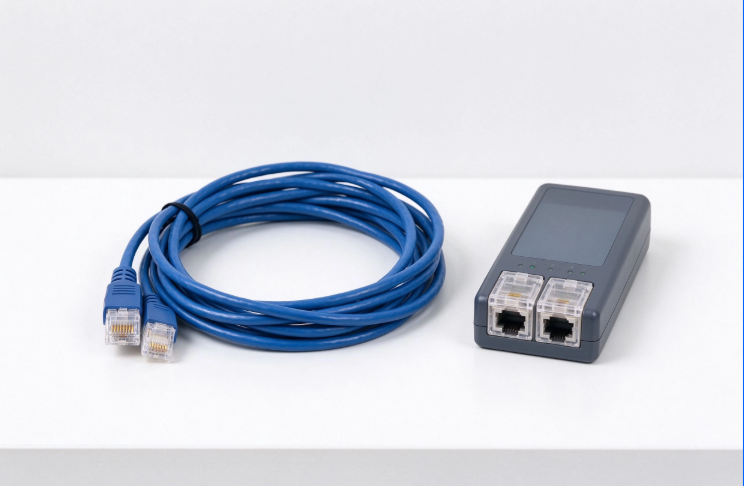
An Ethernet crossover cable is used to connect two similar network devices directly, such as computer-to-computer, switch-to-switch, or router-to-router, without needing an intermediate switch or hub. It swaps the transmit and receive wire pairs so both devices can communicate correctly, especially on older Ethernet equipment that does not support auto-MDI/MDIX.
What is ethernet crossover cable?
An Ethernet crossover cable is a special twisted-pair Ethernet cable designed to connect similar devices directly. Unlike a standard straight-through cable, it crosses specific transmit and receive wires at opposite ends, allowing two network interfaces to send and receive data without requiring a switch, hub, or other intermediary device.
ethernet crossover cable
Basic Definition and Purpose
An Ethernet crossover cable looks similar to a regular Ethernet patch cable, but its internal wiring is different. The key difference is in the termination pattern at each connector: one end typically follows the T568A wiring standard, while the other follows T568B. This creates the “crossover” effect.
A cable Ethernet crossover is mainly used when two devices of the same type need to communicate directly. This was especially important before modern devices commonly included auto-MDI/MDIX, a feature that automatically detects and adjusts transmit/receive pairs.
Common use cases include:
Connecting one PC directly to another PC
Connecting two switches together when uplink ports are unavailable
Connecting two routers directly for lab or testing environments
Connecting older network devices that do not auto-negotiate cable type
Creating temporary peer-to-peer file transfer connections
Based on our internal data and market analysis, here is the breakdown:
Cable Type
Typical Wiring
Best Used For
Modern Relevance
Straight-through cable
Same standard on both ends
PC to switch, router to switch
Most common Ethernet cable
Ethernet crossover cable
T568A on one end, T568B on the other
Similar device-to-device links
Still useful for legacy equipment
Rollover cable
Reversed pin order
Console connections
Specialized network management use
cwcables Pro Tip: I always recommend checking the device ports first. If both devices support auto-MDI/MDIX, a regular straight-through cable will usually work, but keeping one labeled crossover cable in a toolkit is still very useful for older gear and troubleshooting.
How Does ethernet crossover cable Work?
An Ethernet crossover cable works by reversing the transmit and receive wire pairs between the two RJ45 connectors. This allows the transmit pins on one device to connect directly to the receive pins on the other, enabling two similar Ethernet devices to communicate without a switch.
ethernet crossover cable
Signal Pair Crossover Principle
Ethernet communication depends on dedicated wire pairs for transmitting and receiving data. In older 10BASE-T and 100BASE-TX Ethernet, pins 1 and 2 are commonly used for transmitting, while pins 3 and 6 are used for receiving. If two similar devices are connected with a standard straight-through cable, their transmit pins may connect to transmit pins, and their receive pins may connect to receive pins, preventing communication.
An Ethernet crossover cable pinout solves this by crossing the key pairs:
Based on our internal data and market analysis, here is the breakdown:
Pin on End A
Signal on End A
Pin on End B
Signal on End B
1
Transmit +
3
Receive +
2
Transmit –
6
Receive –
3
Receive +
1
Transmit +
6
Receive –
2
Transmit –
4, 5, 7, 8
Usually unchanged for 10/100 Mbps
4, 5, 7, 8
Usually unchanged for 10/100 Mbps
For Gigabit Ethernet, all four wire pairs may be used for bidirectional communication. Many Gigabit devices also include auto-MDI/MDIX, so crossover cables are less commonly required, but the wiring concept remains important in legacy and lab environments.
cwcables Pro Tip: When I troubleshoot a direct device-to-device connection, I check link lights first. If there is no link light and the equipment is older, switching from a straight-through cable to a crossover cable is one of the fastest tests.
ethernet crossover cable
What are the benefits of ethernet crossover cable?
The main benefit of an Ethernet crossover cable is direct communication between similar devices without extra networking hardware. It is practical for quick testing, legacy equipment, temporary file transfers, lab setups, and troubleshooting when a switch or hub is unavailable or unnecessary.
Practical Advantages in Networking
Although modern Ethernet equipment often adjusts automatically, crossover cables still offer practical value. They are simple, inexpensive, and effective for direct connections, especially in controlled environments such as IT labs, field service kits, and network repair work.
Key benefits include:
Direct device connection: Connect two computers, switches, or routers without a separate network device.
Useful for legacy hardware: Older devices may require a crossover cable to establish a link.
Fast troubleshooting: Helps determine whether a port, switch, or cable type is causing a connectivity issue.
Simple temporary networking: Useful for quick file sharing or configuration tasks.
Low cost: Usually similar in price to standard patch cables.
No power required: Unlike a switch, the cable itself needs no power source.
Based on our internal data and market analysis, here is the breakdown:
Benefit
Why It Matters
Typical Scenario
Direct link
Reduces dependency on switches
PC-to-PC file transfer
Legacy support
Works with older non-auto-MDI/MDIX ports
Older switches or routers
Troubleshooting value
Helps isolate cable and port issues
Field diagnostics
Portability
Easy to carry in a toolkit
Installer or technician use
cwcables Pro Tip: I keep a crossover cable in a different color from standard patch cables. It saves time on-site because I can identify it instantly instead of testing or tracing the cable before use.
How to maintain a ethernet crossover cable?
To maintain an Ethernet crossover cable, protect the connectors, avoid sharp bends, keep the cable dry, label it clearly, and test it periodically with a cable tester. Proper storage and identification help prevent damage, confusion with straight-through cables, and avoidable network troubleshooting errors.
Care, Testing, and Storage Practices
A crossover cable is maintained much like any other Ethernet patch cable, but identification is especially important because it is wired differently. If it is mixed with straight-through patch cables, it can cause confusion during installations or troubleshooting.
Recommended maintenance steps:
Label both ends clearly
Mark the cable as “crossover” near each RJ45 connector.
Use a unique color
Choose a cable jacket color that differs from standard Ethernet patch cables.
Avoid tight bends
Keep bend radius gentle to protect twisted pairs and maintain signal quality.
Protect the RJ45 clips
Broken latch clips can cause loose connections or intermittent links.
Store it coiled loosely
Avoid kinks, knots, and compression under heavy tools or equipment.
Test before critical use
Use a cable tester to verify the crossover pinout and continuity.
Based on our internal data and market analysis, here is the breakdown:
Maintenance Task
Recommended Frequency
Reason
Visual connector inspection
Before each use
Detect cracked plugs or broken clips
Cable tester verification
Periodically or before field work
Confirm proper crossover wiring
Label check
After storage or transport
Prevent mix-ups with standard cables
Jacket inspection
Every few months
Identify cuts, kinks, or crushing
cwcables Pro Tip: I recommend testing a crossover cable after lending it out or using it in the field. Cables get pulled, bent, and relabeled, and a quick tester check can prevent wasted troubleshooting time later.
What is the price of ethernet crossover cable?
The price of an Ethernet crossover cable is usually low and depends on length, category rating, jacket material, connector quality, and whether it is factory-made or custom-terminated. Short crossover patch cables often cost only a few dollars, while longer or industrial-grade versions cost more.
Typical Price Ranges and Cost Drivers
Crossover cables are generally affordable because they use the same basic materials as standard Ethernet patch cables. The wiring pattern is different, but the cable category, conductor type, and connector quality have the biggest impact on price.
Based on our internal data and market analysis, here is the breakdown:
Cable Type
Common Length
Typical Price Range
Best For
Basic Cat5e crossover cable
3–10 ft
Low cost
Simple legacy connections
Cat6 crossover cable
3–25 ft
Low to moderate
Better noise performance
Shielded crossover cable
3–50 ft
Moderate
Noisy electrical environments
Custom crossover cable
Any specified length
Moderate to higher
Professional or specialized installs
Factors that affect pricing include:
Cable category, such as Cat5e or Cat6
Shielded vs unshielded construction
Copper conductor quality
Molded boot and strain relief design
Jacket rating, such as PVC, riser, or plenum
Custom length and custom labeling requirements
cwcables Pro Tip: I would not choose the cheapest option if the cable will be used repeatedly for diagnostics. A durable molded connector and clear labeling are worth more than saving a small amount upfront.
Key Features & Comparison
An Ethernet crossover cable is defined by its crossed transmit and receive pairs, usually using T568A on one end and T568B on the other. Compared with a straight-through cable, it is intended for direct similar-device connections, especially when automatic port detection is not available.
Straight Through Cable vs Crossover Cable
Understanding straight through cable vs crossover cable differences is essential when working with older Ethernet devices. A straight-through cable keeps the same wiring standard on both ends, while a crossover cable uses different standards on each end to reverse key pairs.
Based on our internal data and market analysis, here is the breakdown:
Feature
Ethernet Crossover Cable
Straight-Through Cable
Wiring pattern
T568A on one end, T568B on the other
Same standard on both ends
Main purpose
Connect similar devices directly
Connect different device types
Common use
PC-to-PC, switch-to-switch, router-to-router
PC-to-switch, router-to-switch
Pin behavior
Transmit and receive pairs are crossed
Pin-to-pin wiring remains consistent
Modern requirement
Less common due to auto-MDI/MDIX
Still the default cable type
Identification
Compare color code at both RJ45 ends
Both RJ45 ends match
Best environment
Legacy devices, labs, troubleshooting
General network installations
Ethernet crossover cable color code is usually identified by checking the order of wires inside the transparent RJ45 plugs. If one end follows T568A and the other follows T568B, it is a crossover cable.
Typical color code comparison:
Pin
T568A Color
T568B Color
1
White/Green
White/Orange
2
Green
Orange
3
White/Orange
White/Green
4
Blue
Blue
5
White/Blue
White/Blue
6
Orange
Green
7
White/Brown
White/Brown
8
Brown
Brown
cwcables Pro Tip: When identifying an Ethernet crossover cable, I hold both RJ45 plugs side by side with the clip facing away and compare the wire colors. If pins 1, 2, 3, and 6 differ in the T568A/T568B pattern, it is likely crossover.
Cost & Buying Factors
When buying an Ethernet crossover cable, consider device compatibility, cable category, length, shielding, connector durability, and labeling. Price matters, but the best cable is the one that matches the application, supports the required speed, and can be easily identified during installation or troubleshooting.
Purchasing Criteria That Matter
Before buying a crossover cable, confirm whether you actually need one. Many modern switches, routers, and network interface cards support auto-MDI/MDIX, meaning they can often use a standard straight-through cable for direct connections. However, crossover cables remain useful for older equipment and technician toolkits.
Use this buying checklist:
Check device age and port capability
Older equipment is more likely to require a crossover cable.
Choose the right category
Cat5e is often enough for basic use, while Cat6 offers better performance margin.
Pick the correct length
Avoid excessive slack, but leave enough cable for safe routing.
Decide on shielding
Use shielded cable in areas with motors, power equipment, or high electromagnetic interference.
Look for molded strain relief
This improves durability near the RJ45 connectors.
Prioritize clear labeling
A marked cable prevents confusion with standard patch cords.
Based on our internal data and market analysis, here is the breakdown:
Buying Factor
Why It Matters
Recommendation
Cable category
Affects bandwidth and performance margin
Choose Cat5e or Cat6 for most uses
Length
Impacts routing convenience
Keep it as short as practical
Shielding
Reduces interference
Use shielded cable in noisy areas
Connector quality
Affects reliability
Choose molded or well-terminated plugs
Labeling
Prevents cable mix-ups
Use marked or color-coded cables
cwcables Pro Tip: I suggest buying crossover cables only in the lengths you actually need. Very long patch cables create clutter and are harder to manage, especially when the cable is used mainly for testing or temporary direct links.
Conclusion
An Ethernet crossover cable is used for direct connections between similar network devices, particularly older computers, switches, and routers that do not automatically adjust transmit and receive pairs. While less common today, it remains a valuable tool for legacy networking, testing, and troubleshooting.
Final Recommendation for Practical Use
A crossover cable is no longer required for many modern Ethernet connections, but it still has a clear purpose. If you work with older hardware, lab environments, temporary device-to-device links, or field troubleshooting, it is worth keeping one available.
Key takeaways:
An Ethernet crossover cable swaps transmit and receive pairs.
It is mainly used for similar device-to-device connections.
It differs from a straight-through cable in its RJ45 pinout.
You can identify it by comparing the T568A and T568B color code at each end.
It is still useful when auto-MDI/MDIX is unavailable.
Proper labeling prevents confusion with standard Ethernet cables.
For dependable networking work, choose a well-built, clearly labeled crossover cable from a trusted supplier such as cwcables, especially if it will be part of a professional installation or troubleshooting kit.
cwcables Pro Tip: I treat crossover cables as specialty tools. You may not use one every day, but when you need it for an older device or direct test connection, having a reliable, labeled cable ready can save significant time.